Child Mapping in DataSync
Child mapping tells DataSync to use the parent table's change tracking instead of the child table's own. When a parent record changes, DataSync deletes and reloads all related child records for that parent, ensuring child data always reflects the latest state in the ERP.
This is based on how ERP systems structure related data. A parent table holds the main record, and one or more child tables hold the associated details. An invoice header and its line items are a typical example. These tables are linked through a foreign key, a field in the child table that references the parent record. Child mapping uses that relationship to know which child records to reload when the parent changes.
To edit an existing mapping, click the Manage Child Mappings icon in the upper-right corner of the table view.
When to use child mapping
- Synchronize related tables reliably when the child table does not consistently report its own changes during incremental loads.
- Catch deleted child records that would otherwise be missed when running Process Deleted Records.
- Work around incomplete API change tracking in sources, where child table modifications are not always returned by the API.
How child mapping works
During a Truncate and Load, DataSync loads each table independently and child mapping has no effect. During an Incremental Load or Process Deleted Records, DataSync normally relies on the child table's own change tracking. In some ERP systems, this information is incomplete. Child records can be missed, deleted records may not be detected, and the destination ends up out of sync with the ERP.
With child mapping configured, DataSync handles this differently:
- DataSync detects changes in the parent table based on its modified date.
- For each changed parent record, it deletes all existing child records linked to that parent in the destination.
- It reloads those child records fresh from the ERP.
The destination always reflects the current state of the ERP for any parent record that changed.
The Invoice Header table is the parent and Invoice Detail is the child, linked by the invoice ID.
Example
If a customer returns one item from invoice 1001 and adds a different product.
- The Invoice Header modified date updates.
- The Invoice Detail changes, but those changes are not surfaced through the API.
DataSync detects the change on invoice 1001 in the parent table, deletes all existing Invoice Detail records for that invoice in the destination, then reloads them from the ERP.
The Invoice Header modified date is what triggers the child reload, not the change in Invoice Detail itself.
Configure child mapping
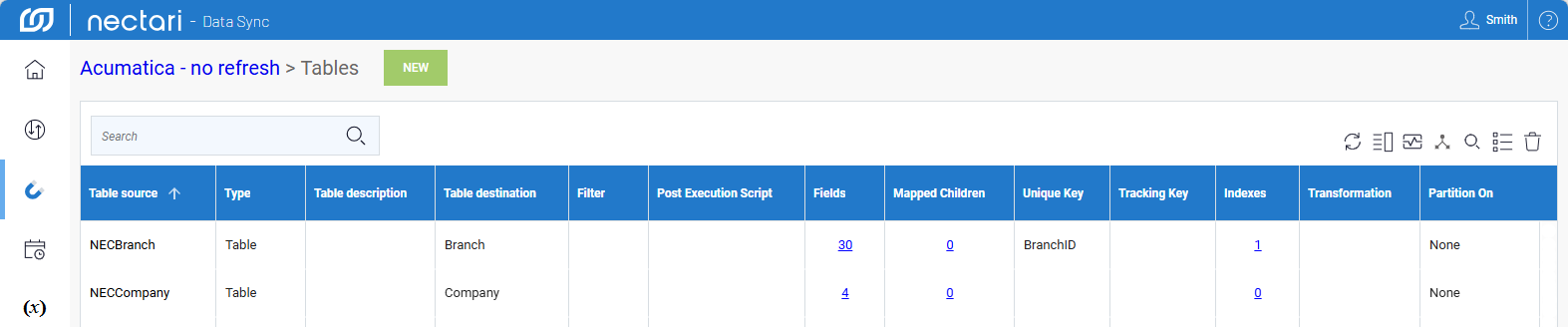
- From the welcome screen or left navigation pane, select Extractions.
- Select an extraction, then click the Tables link.
- Select the parent table, then click Mapped Children.
- Click Add to add a child table mapping.
- Select the child table from the dropdown.
- In Field Mapping 1, select the Parent Field and the corresponding Child Field that links the two tables.
- Optional. Click Add to add more field mappings if the relationship spans multiple fields.
- Click Confirm.
You can add as many child mappings as needed for the same parent table.