Duplicate Key Error When Running an Extraction
Problem
When you run an Incremental Load or Process Deleted Records in DataSync, the run fails during the propagate step with a duplicate key error, and the table does not get updated. This happens on tables such as GLAccountBalance, where the error reads The duplicate key value is (ACCRUAL, USD, Nectari Opening 2026, 10122, A01, 302, <NULL>, 0, 0, 1830, 0, 0, 13, CP). The statement has been terminated.
Cause
The unique key on a table like GLAccountBalance can include a field that is empty, stored as NULL. The Primary Keys does not contain NULL setting tells DataSync to ignore empty key values, which prevents it from finding the old record to delete during an incremental load or a Process Deleted Records load.
The old record stays in the table, and the database rejects the updated one because both share the same key.
Solution
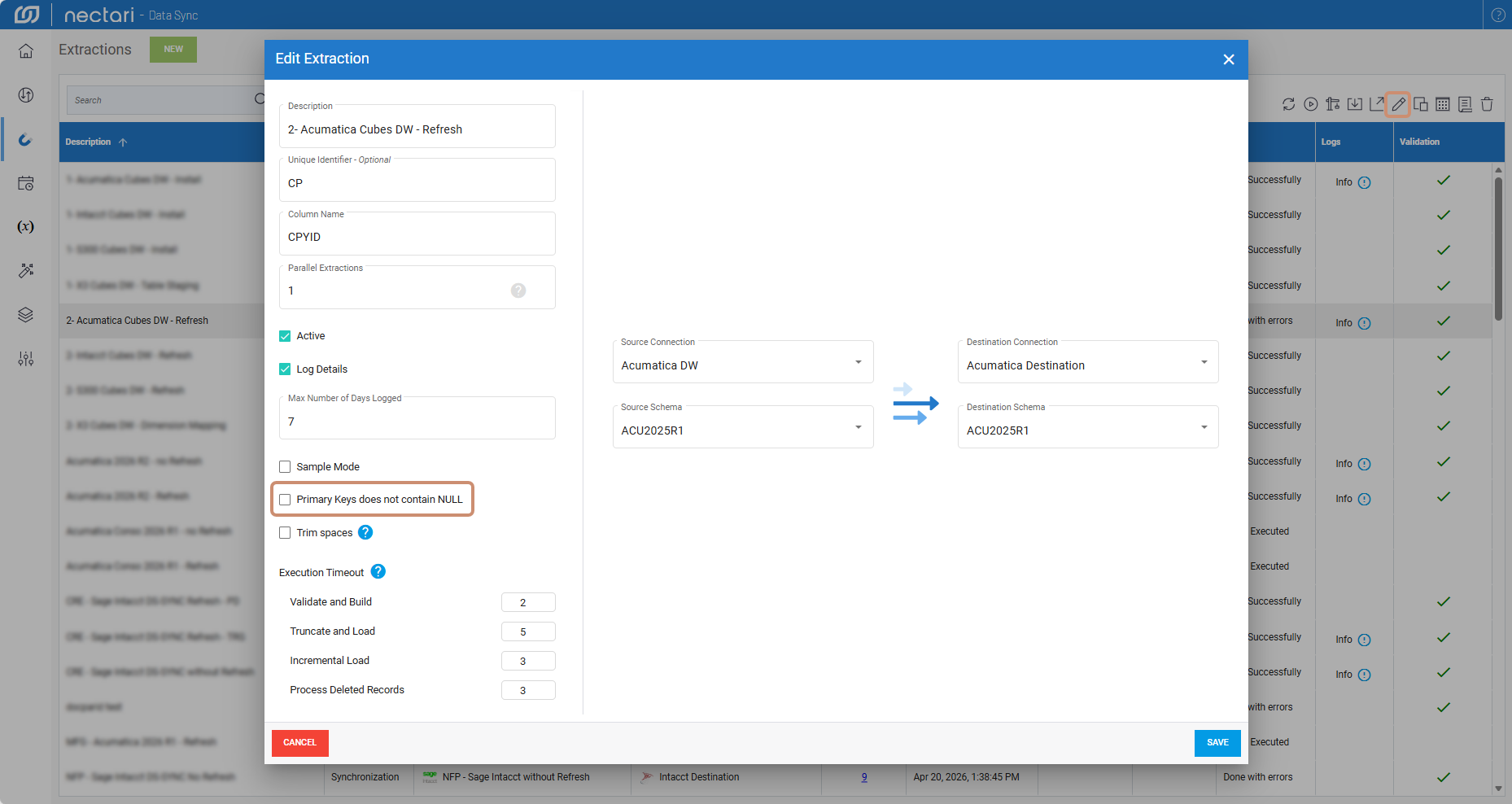
Turn off the Primary Keys does not contain NULL setting on the extraction, then run the extraction again.
- In DataSync, select Extractions.
- Select the extraction that failed.
- Click the pencil icon at the top right corner to open the Edit Extraction dialog.
- Uncheck the Primary Keys does not contain NULL checkbox.
- Click Save.
- Run the extraction again.