Excel Add-in Distribution Fails on Excel Paste Bug
Troubleshooting, Excel Add-in
Problem
When distributing a workbook through the Excel Add-in, a distribution job fails or produces incomplete output, with no clear error message. This happens on Data Extraction with adjacent formulas, and only affects the machine set up to run Excel Add-in distribution jobs.
Cause
A Microsoft security update broke copy and paste in Excel when the sheet being copied has conditional formatting applied. The Excel Add-in for Nectari uses that same paste function, which makes it break too.
Microsoft describes the issue in The paste operation might fail with no notifications in Excel.
Solution
Two fixes are available. Start by updating Microsoft Office. If the problem isn't resolved, remove all conditional formatting instead.
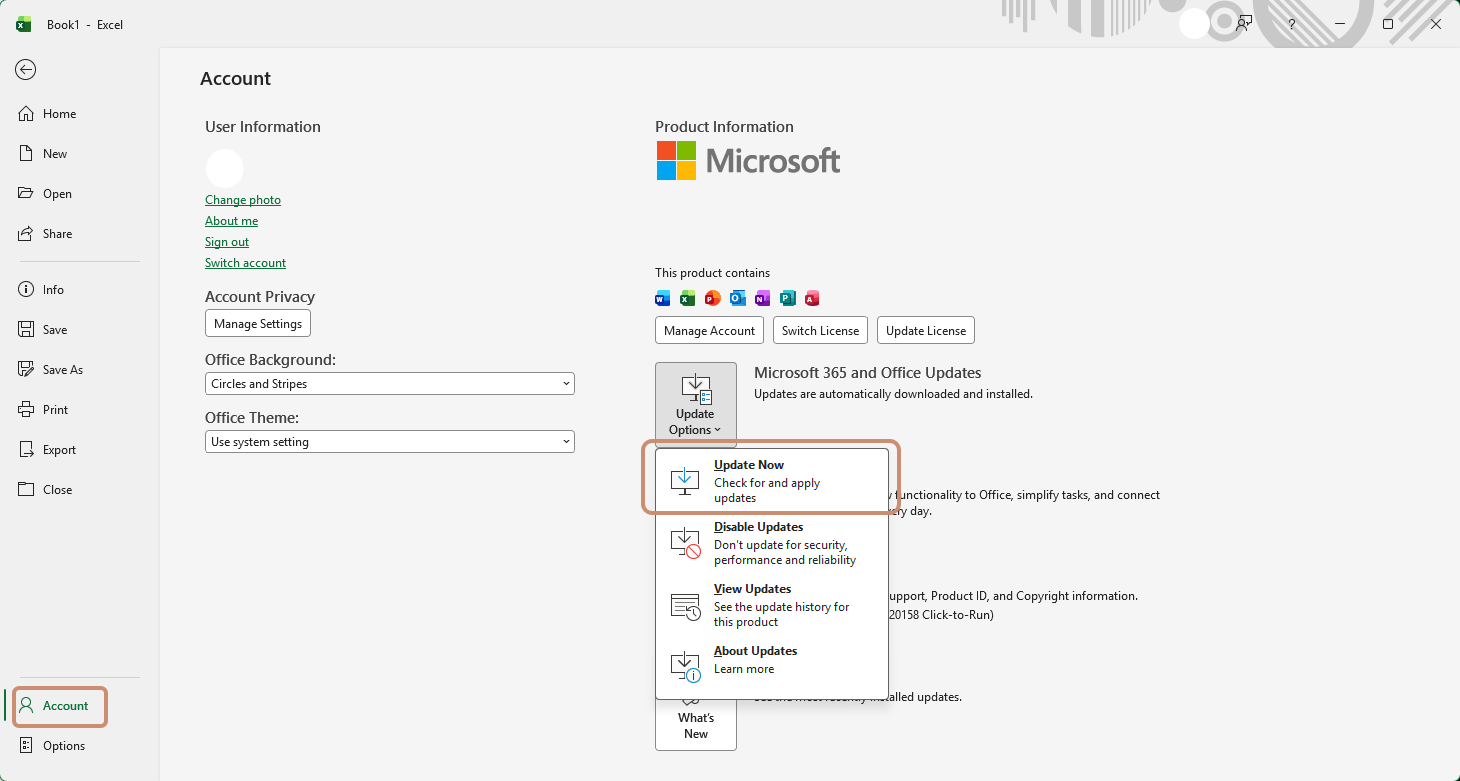
Update Excel on the server
- Open Excel on the Nectari server.
- Select the File tab.
- Click Account (or Office Account) below the left sidebar.
- Click Update Options, then Update Now.
Remove conditional formatting
- If the paste still fails after updating, open the affected worksheet in Excel.
- Select the cells with conditional formatting applied.
- Remove the conditional formatting rules from those cells.
- Save the file.
- Close Excel completely.
- Reopen Excel, then reopen the file.