Snowflake Destination Connector
The Snowflake destination connector writes extracted and transformed data from DataSync into a Snowflake database. Snowflake is a fully managed, cloud-based OLAP database built for batch processing and large datasets. DataSync supports key pair authentication for Snowflake, using a public and private key pair instead of a password.
Because of how Snowflake is built, a few standard database features work differently here. Snowflake does not support triggers or indexes, and it only enforces NULL and NOT NULL constraints on standard tables. This means that when you add a Snowflake source table to an extraction, any indexes from the original source are not carried over, and you cannot create indexes manually afterward.
Once your destination connection is ready, create your extraction to define what data gets loaded and how.
How Snowflake stores and processes your data
- Storage and compute are separate and scale independently of each other.
- Data is automatically partitioned into chunks of 50 to 100 MB, stored in a columnar format. Each partition tracks minimum and maximum values, letting Snowflake skip irrelevant partitions during a query.
- Queries run in parallel across multiple compute nodes instead of on a single machine.
Create the destination connection in DataSync
- Log in to DataSync.
- From the welcome screen, select Connections.
- Next to Destination Connections, click New.
- Select Snowflake.
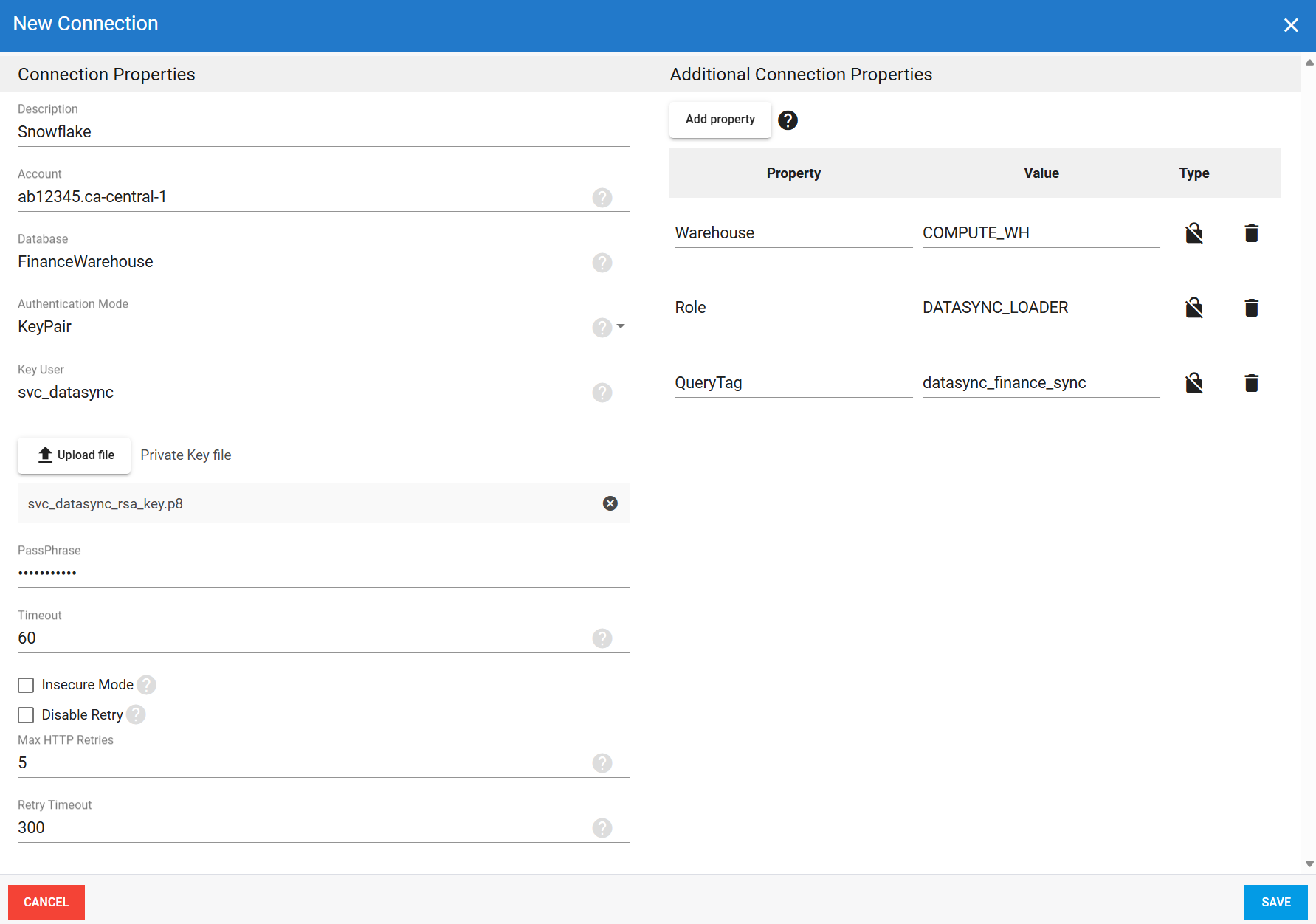
- Enter all required connection properties.
- (Optional) In the Additional Connection Properties panel, click Add property and enter any advanced parameters.
- Click Save.
Connection properties
| Property | What to enter |
|---|---|
| Description | Unique name for the connection. Example: Snowflake. |
| Account | Full account identifier. In Snowflake, open the account selector, select your account, then select View Account Details. The identifier appears under Account identifiers. Example: xy12345.us-east-1. |
| Database | Name of the database to write data to. Example: AnalyticsDB. |
| Authentication Mode | Authentication method for the connection.
|
| Username | Basic only Snowflake database username. |
| Password | Basic only Password for this account. The user type must be LEGACY_SERVICE. Snowflake is phasing out single-factor Basic authentication, so use this method only if no other option is available. |
| Key User | KeyPair only Snowflake database username associated with the public key. |
| Private Key File | KeyPair only Path to the private key file associated with the public key. |
| Passphrase | KeyPair only Password protecting the private key file. Leave blank if the key is not encrypted. |
| Timeout | Time in seconds to wait before a connection attempt or query execution times out. |
| Insecure Mode | Disables certificate revocation list checks. Use only as a temporary workaround during OCSP-related service disruptions. |
| Disable Retry | Disables automatic retries on failed HTTP requests to Snowflake API endpoints. |
| Max HTTP Retries | Maximum number of retry attempts for failed HTTP requests when retries are enabled. Range: 1 to 999. Default: 7. |
| Retry Timeout | Total time in seconds allowed for requests covered by the retry policy. Default: 300. |
Additional connection properties
Use this panel to enter connection string properties not available in the Connection Properties panel. For sensitive values such as passwords, set the type to Encrypted. The value is hidden in the interface and stored encrypted in the back end.
| Property | What to enter |
|---|---|
| Property | Connection string property that defines the action or behavior. Example: ReadOnly. |
| Value | Value for the property. Example: True. |
| Type | Visibility settings: Visible or Encrypted. |
Key pair authentication example setup