Annual Budget
The Annual Budget Writeback template creates and updates general ledger budgets in Acumatica by period, directly from a workbook. Monthly amounts can be calculated from actuals from a prior year or an existing budget version, or entered manually. Use this template for annual, departmental, branch, or company wide budgets. It uses the NECWRITEBACK formula, generated with the Writeback Wizard, to send changes from your workbook back to Acumatica.
Select Initialize before editing budget amounts. This creates a separate workbook copy with static data, so your work isn't lost on refresh.
Typical workflow
- Select the Budget Ledger, Financial Year, and optional branch or subaccount filters.
- Select the Actual Ledger and Actual Year Reference used for comparison and helper calculations.
- If the budget does not already exist, select Create Budget, then refresh the workbook.
- Select Initialize to create a working copy of the template.
- Use the budget helper columns to calculate monthly amounts from the reference-year actuals, or enter values directly in the monthly budget columns.
- Review the monthly amounts, annual total, and line status.
- Select Push to Acumatica to write the budget values to Acumatica.
- Select individual lines and use Release Selected, or Release All to release the entire budget.
- Select Reset before preparing another budget or discarding unsaved changes.
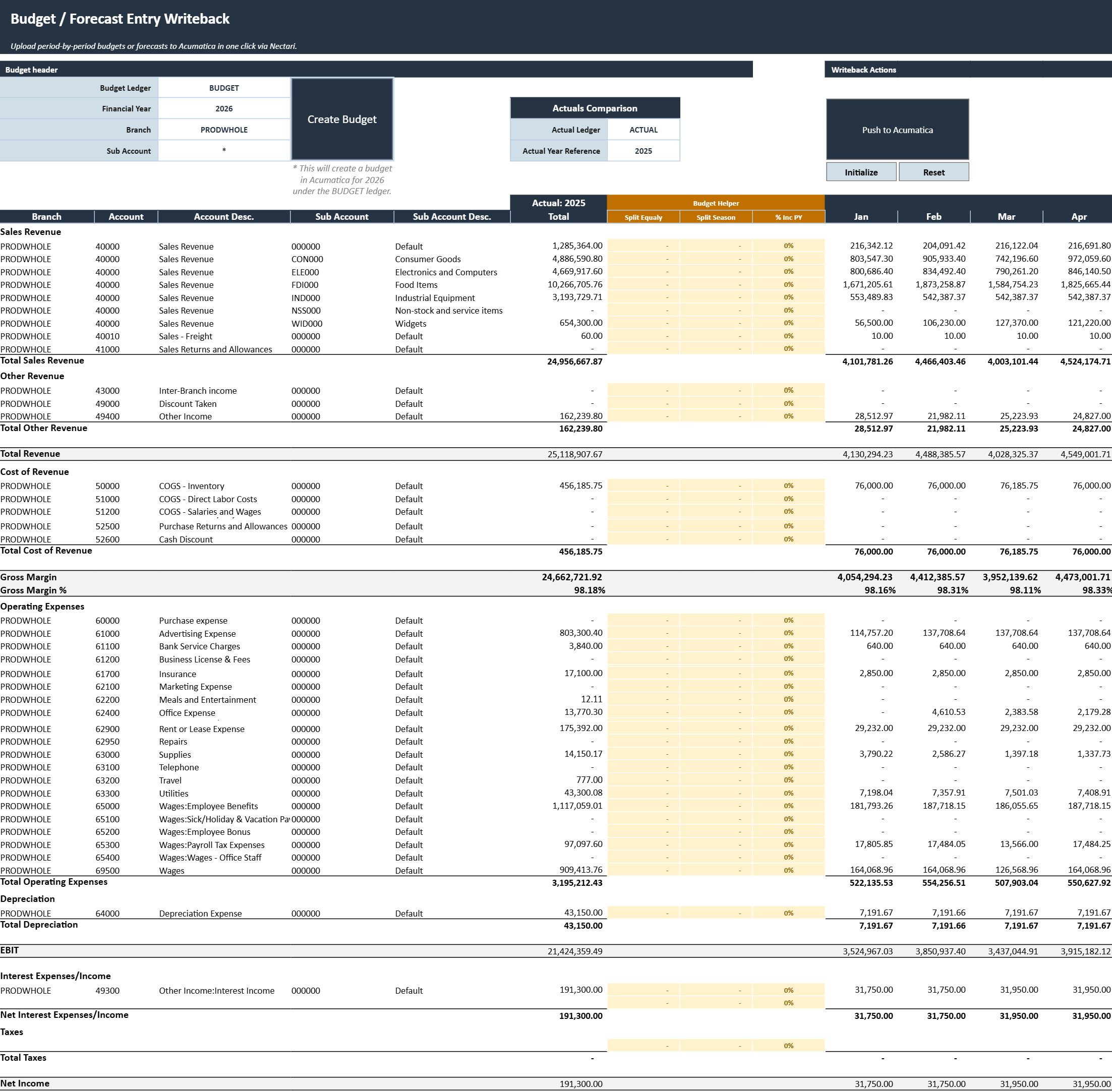
Budget header
The header identifies the Acumatica budget to update.
| Field | What to select |
|---|---|
| Budget Ledger | Budget ledger that contains the annual budget. |
| Financial Year | Fiscal year for which the budget is being prepared. |
| Branch | Optional branch used to limit or define the budget records displayed. |
| Sub Account | Optional subaccount filter used to narrow the displayed budget lines. |
Actual comparison
- Actual Ledger: Ledger used for prior-year comparison and helper calculations.
- Actual Year Reference: Fiscal year used as the starting point for the budget.
Writeback actions
| Action | What it does |
|---|---|
| Create Budget | Creates the selected budget ledger and financial year in Acumatica when they do not already exist. Refresh the workbook after creation so the new budget records are available in the template. |
| Push to Acumatica | Writes the prepared monthly budget amounts to Acumatica. A confirmation message indicates whether processing completed successfully. |
| Initialize | Creates a separate workbook copy with (Initialized) added to the file name. Data extractions are disabled and the extracted budget data is made static in this copy so it remains available while the budget is being prepared. |
| Reset | Clears the current changes and restores the template to its last saved state. Any unsaved budget entries or edits are removed. |
| Release Selected | Releases the budget lines whose Select checkboxes are enabled. |
| Release All | Releases all eligible lines in the selected budget. |
Budget grid
The budget grid displays the selected accounts, reference-year actuals, calculation helpers, and monthly budget amounts.
| Column | What it shows |
|---|---|
| Branch | Branch associated with the budget line. |
| Account | General ledger account included in the budget. |
| Account Desc. | Description of the general ledger account. |
| Sub Account | Subaccount associated with the budget line. |
| Sub Account Desc. | Description of the subaccount. |
| Actual Total | Total actual amount for the selected reference year. |
| Split Equally | Annual amount to distribute evenly across all fiscal periods. |
| Split Season | Annual amount to distribute according to the monthly pattern of the reference-year actuals. |
| % Inc PY | Percentage increase or decrease applied to each reference-year monthly actual amount. |
| January to December | Budget amount for each fiscal period. Values may be generated by a helper or entered manually. |
| Total | Sum of the monthly budget amounts for the line. |
| Status | Current Acumatica status of the budget line, such as released or unreleased. |
| Select | Marks the line for use with Release Selected. |
Budget helper columns
Each helper column calculates monthly amounts from the annual figure using a different method. Manual entry always remains available, and any helper result can be overridden.
- Split Equally divides the annual amount evenly across all fiscal periods.
- Split Season distributes the annual amount using the monthly pattern of the reference-year actuals.
- % Inc PY applies a percentage increase or decrease to each reference-year monthly actual. 0% reproduces the reference-year actuals as is.
Use one helper per line, matching the budgeting method that fits that account. Review the resulting monthly values before writeback, especially when the reference-year total is zero or the seasonal pattern is unusual.
Review and release
Before writing back the budget:
- Confirm that the correct budget ledger, year, branch, and subaccount scope are selected.
- Review the monthly distribution and annual total for each account.
- Confirm that manual overrides are still in place, since re-running a helper column replaces them.
- Check each line's status to see whether it still requires release.
Writing budget values to Acumatica and releasing them are separate actions. Use Release Selected for individual lines or Release All for the full budget.